What an AI visibility report shows
This is the report you get for a brand, walked through screen by screen: which questions are asked, which AI engines answer, how a mention or a recommendation is counted, what the weekly verdict says and how wide its range is, who is named instead of you and what to do next.
- Brand
- Lumen CRM, a fictional CRM for small teams
- Questions
- 7 buyer questions, none of them names the brand
- Engines
- ChatGPT, Gemini, Perplexity and Claude
- History
- 9 weekly runs
The questions that get asked
A report starts with the questions your buyers would type into an AI assistant: the best tool for their kind of company, the problem they want solved, alternatives and comparisons. You write them yourself, or Nodpick suggests them from your category, country and language.
A question never names your brand. That way every mention counted in the report is one the engine made on its own, not one you put into its mouth.
- What is the best CRM for a small business?
- Which CRM do you recommend for a 10 person sales team?
- Cheap CRM alternatives to Salesforce
- Best CRM for startups in the UK
These are four of the seven questions in the example. The free check asks 5 questions once; paid plans ask their full list every week.
Which engines answer
Every question goes to several AI engines, each in your buyers' country and language. Every paid plan covers ChatGPT, Google AI Overviews, Google AI Mode, Gemini, Perplexity and Claude; the engine table on the method page says which ones search the web and which plans include them.
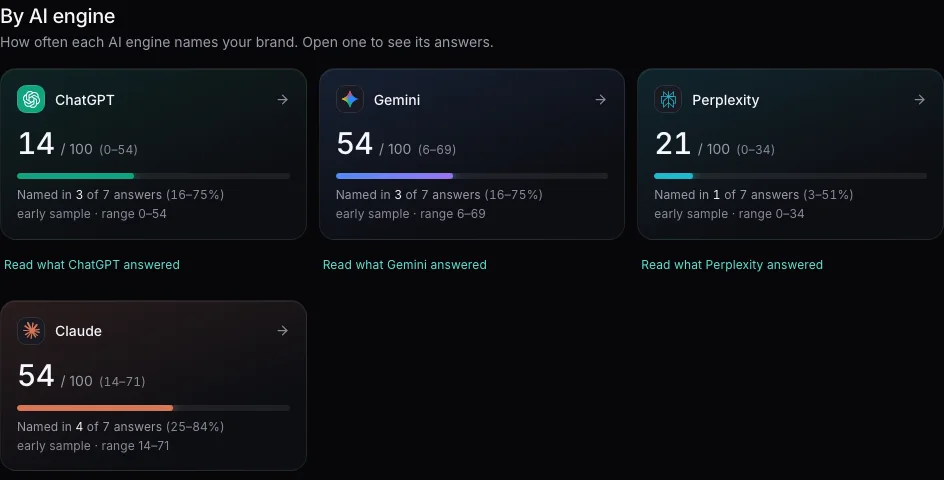
Each engine gets its own score, built from its answers only. Engines differ a lot, so the same brand can look strong in one and invisible in another. The example below has one score per engine, each with a range.
How a mention and a recommendation are counted
Every answer is stored in full and can be read in the report: the engine, the question, which brands it named in which order, which sources it cited. Filters sort the answers by what they did with your brand.
An answer that names you is put into one of three groups, and the report notes separately whether it cites your own site. Being named is not the same as being recommended.
| Group | What it means |
|---|---|
| Recommended | The answer recommends you or puts you forward as its top pick. |
| Just mentioned | You are named neutrally, as one of several options. |
| Negative | The answer warns against you. |
| Cited | Your own site is one of the answer's sources, named or not. |
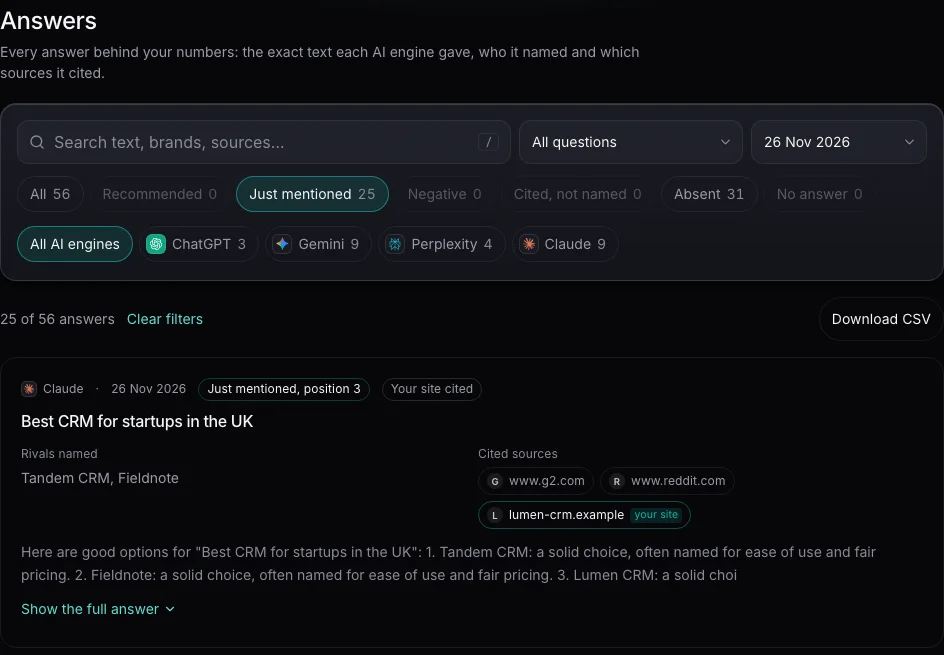
The position decides the points. The first brand named earns 100, the second 80, the third 60, the fourth or later 40 and a brand that is not named 0. Your visibility score is the average of these points over every engine and question that got an answer. The recommendation rate is the share of answers that recommend you, and with fewer than 10 answers the report says "unclear" instead of showing a number that would mean little.
The weekly verdict and its range
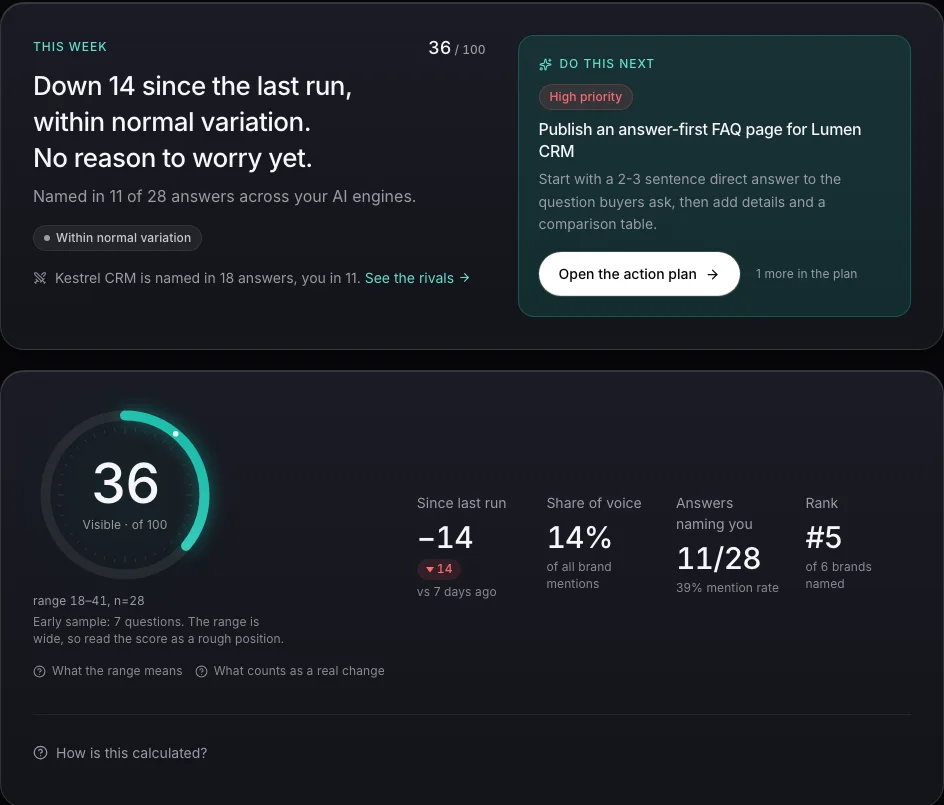
On top of the report sits one sentence about the week: what changed, and whether it is a real change. Next to the score you see its range, because a score is an estimate from a sample of AI answers and can be off.
In the example the score fell by 14 points. The report still calls it within normal variation, and the reason is on the screen: only 7 questions were asked, the range runs from 18 to 41, and a small sample like that swings widely from week to week. A change only counts as real when enough questions were answered in both weeks, a statistical test is clear, it is at least 5 points and, once there is history, it is larger than the brand's usual swing.
History instead of a single number
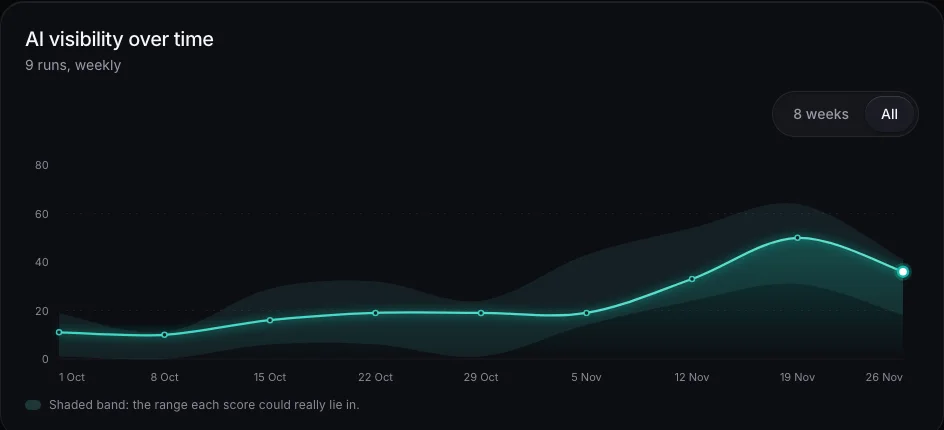
Paid plans ask every question every week, so the report becomes a line with a shaded band: the range each score could really lie in. A single week says little. Several weeks show whether the brand is moving or only wobbling.
When a brand's mention flips from one week to the next, the question is asked again right away and both answers count, which keeps single odd answers from steering the line.
Who is named instead of you
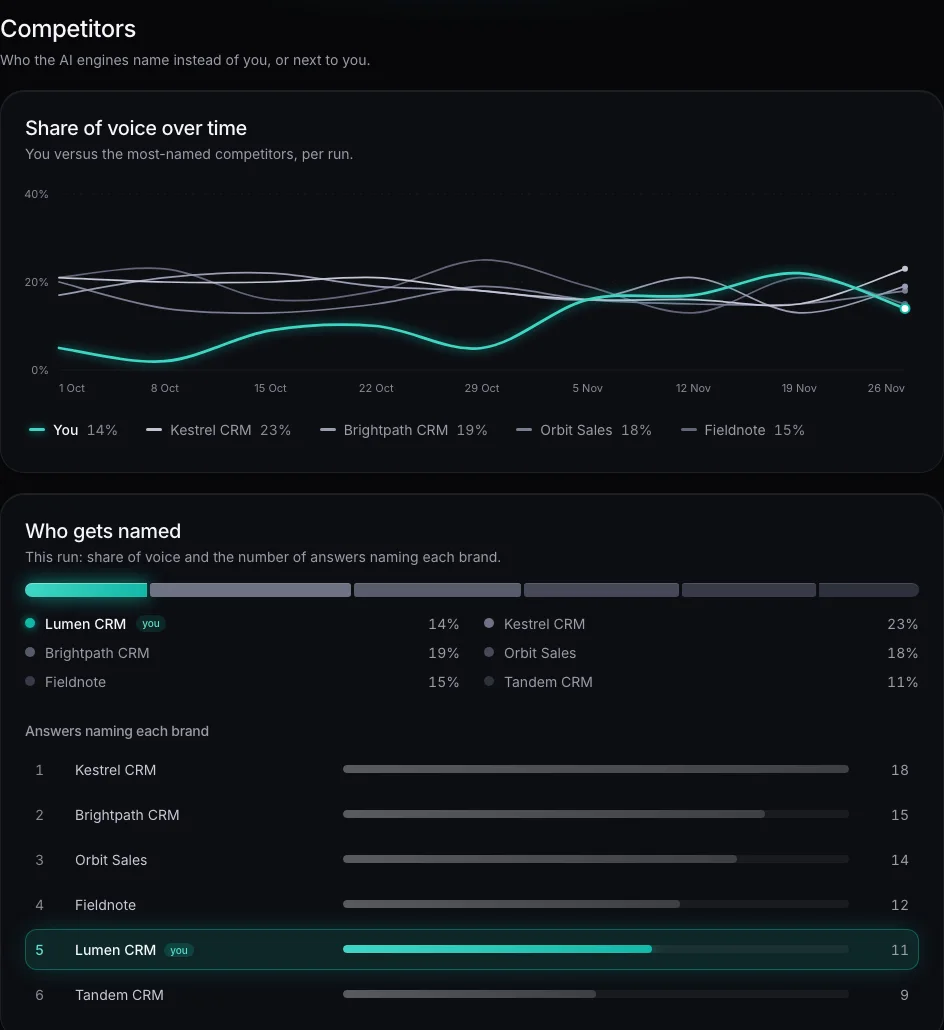
The competitor view shows share of voice: out of all brand mentions in the answers, how many go to you and how many to each rival, per week and in the latest run. You name the rivals you care about, and the report also lists brands you did not expect.
This is the view to put in front of a client: not only whether the brand appears, but who the engines put next to it or in front of it.
What you do with it
A report is only useful if it ends in a decision. This is the order in which it is meant to be read.
- Read the verdictIs the change real, within normal variation or too little data? Only a real change deserves a reaction.
- See who is named insteadCheck the rivals and the cited sources. If the engines keep naming the same brand, look at where they take that from.
- Start with the biggest fixThe action plan ranks fixes and gives each an evidence grade: documented, studied or untested. A fix is a proposal with a stated level of proof, not a promise of a ranking.
- Measure again next weekRun the same questions, then read the week verdict again. Whether a fix did anything shows up in the next real change, not in a single answer.
What this example does not show
- It is not a result for any real brand. Scores, answers and rivals are sample data.
- It uses four engines. Google AI Overviews and AI Mode are measured in the paid plans and have their own view.
- It does not cover Microsoft Copilot, voice assistants or personal answers (signed in, with chat history).
Questions about the report
Is this a real customer's report?
No. The brand, its rivals, the questions, the answers and all scores are sample data created for this page. The screens are real product screens filled with that data.
Can I get a report for my own brand?
Yes. The free check measures your brand once with 5 questions and shows the same kind of screens in a smaller form. The paid plans repeat the questions every week.
How do I know a score is not just noise?
Every score comes with a range, and the weekly verdict only calls a change real when it passes the rules described on the method page.
Can I read the answers behind a score?
Yes. Every answer is listed with its engine, question, brands named and sources cited, and you can export the list as CSV.
Read more
See your own brand in a report like this
Run the free check for your website: 5 buyer questions, the engines' answers, who is named instead and what to fix first.